
Satex is a string diagram generator for LaTeX. It takes as input a formula such as
(1 * delta) * (mu * 1)(appropriately written in the LaTeX file) and produces a diagram such as
generated using TikZ.
In order to get started, you can have a look at
In case you have a problem, please file a bug report.
This is inspired from catex (when the sources were not available).
Installing with opam is as simple as
opam install satexIf you are on mac, you can first install opam with brew with
brew install opam
opam initIn order to use satex in your LaTeX file, you should first include the style file:
\usepackage{satex}You should then declare the operators you want to use in the format
\deftwocell[options]{name : m -> n}which declares an operator named name with
m inputs and n outputs. The options in
options allow changing the way the operator is displayed
and so on. For instance,
\deftwocell[triangle]{mu : 2 -> 1}will declare the following operator:

One can then generate diagrams by using commands of the form
\twocell{expr}where expr is a categorical expression involving
operators and identities. The identity on n wires is simply
written as the corresponding number and compositions are noted
*: toplevel compositions are vertical ones and those inside
parenthesis are horizontal. For instance
\twocell{(2 * mu) * (1 * mu) * mu}will typeset
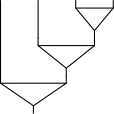
A run of pdflatex on your file, say
file.tex, will generate a file named
file.satex. You should then run
satex file.satexwhich will generate a file file.satix containing the
generated TikZ figures, which are automatically included in the next run
of pdflatex on your file.
Various shapes are available for operators:
circle (default one): 
triangle: rectangle: 
lefthalfcircle / righthalfcircle:  /
/ 
mergeleft / mergeright:  /
/ 
cup / cap:  /
/

sqcup / sqcap:  /
/ 
crossing / crossingl /
crossingr:  /
/ 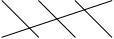 /
/ 
braid / braidl:  /
/ 
crossing' / braid':  /
/ 
dots (horizontal dots between two wires): 
blank: 
The primed variants crossingl' / crossingr'
and braidl' / braidr' behave as above but
leave the wires straight before and after the crossing. The shapes
id (plain identity wires) and none (wires
meeting at the center, with no node decoration) are also available,
although wires are more commonly written using the numeric identity
notation.
Caps and cups can have any (even) number of wires: the arcs are then
nested. For instance (0 -> 4)[cap] typesets
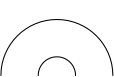
The circle option makes the arcs perfect half-circles
and the arrow option adds an orientation in the middle of
the arc:
 /
/ 
The dimension of the shape can be adjusted with the
labelwidth and labelheight parameters, or both
at once with labelsize (also spelled size or
ls).
Labels are indicated between double quotes. For instance
\deftwocell[triangle,"\mu"]{mu : 2 -> 1}typesets

Their vertical position can be adjusted with the
position parameter (between 0 and
1).
The color of operators and wires can be changed with
color=... options, e.g.
\twocell{((1->1)["\alpha",color=red] * 1) * (1[color=red] * (1->1)["\beta"])}typesets

Filling colors can also be specified with fill=color
option, e.g.
\twocell{((2->1)[r,fill=lightgray,"f"] * (2->1)[r,fill=blue,"g"] * (2 -> 1)[r,fill="red!20!white","h"])typesets

The color of the border of the node alone can be set with
bordercolor=color.
Operators can be hatched by passing the hatch option,
e.g.
\twocell{(1->1)[r,hatched]}typesets

In order for this to work, you need to add
\usetikzlibrary{patterns} in the preamble of your latex
file.
The special operator label allows adding labels to
wires. The option d or u indicates whether the
labels should be put down or up, and the above syntax is used for
labels. For instance
\twocell{label[d,"x","y"] * mu * label[u,"z"]}typesets

You can use operators which have not been declared beforehand: the
syntax is (m -> n)[options] to use an operator with
m inputs, n outputs and given options. For
instance,
(1 * (1 -> 2)[rectangle,"f"]) * ((2 -> 1)["g"] * 1)typesets

Horizontal space can be adjusted by using operators of the form
space2.8 which adds an horizontal space of 2.8
(formally this is an operator with no inputs and outputs).
Vertical space can be adjusted by changing the height
parameter of one of the operators on the line.
You can have a horizontal layout by passing the
--horizontal option to satex.
If you use latexmk and want it to automatically call
satex to generate .satix files, you can add
the following .latexmkrc in your project folder:
$pdflatex = 'internal satex_latex %R %Z pdflatex %O %S';

sub satex_latex {
    my $root = shift;
    my $dir_string = shift;
    my $ret = system @_;
    my $satex = $dir_string . $root . '.satex';
    my $satix = $dir_string . $root . '.satix';
    if ( (-e $satex) && (-s $satex) ) { rdb_ensure_file( $rule, $satix ); }
    return $ret;
}

add_cus_dep('satex', 'satix', 0, 'generate_satix');

sub generate_satix { return system("../satex \"@_.satex\""); }

push @generated_exts, 'satex';
push @generated_exts, 'satix';